
The Codex CLI is one of the most capable AI coding tools available. Developers can build entire applications by describing what they need, the agent plans, writes, and iterates on its own.
That autonomy is powerful. It's also exactly where security breaks down.
When an agent is generating code continuously and operating with real system access, there's no natural pause for a security review. Traditional scanners weren't designed for this. They were designed for humans who write code linearly and commit in discrete chunks.
Agentic coding doesn't work that way. Security tooling needs to catch up.
Today, we're announcing Corridor support for Codex. Corridor now integrates with the Codex CLI via MCP and hooks, bringing real-time security guardrails into Codex without interrupting the development workflow.
How It Works
Corridor operates at two layers inside Codex.
The first is MCP. Corridor's MCP server connects to Codex and enforces your team's security policies at the plan level, before code is written, not after. This works across all platforms and gives teams immediate coverage the moment Corridor is installed.
The second is hooks. Hooks are deterministic scripts that fire at specific points in the code generation process. Unlike MCP, which is subject to the reasoning of the model, hooks run consistently: they're not optional, they don't get skipped, and they don't depend on the LLM deciding to invoke them. This makes them a natural fit for security enforcement. Corridor's hooks run on macOS and trigger post-generation reviews and MCP compliance checks in real time.
The combination gives teams coverage across the full generation loop: guidance before code is written, and enforcement after.
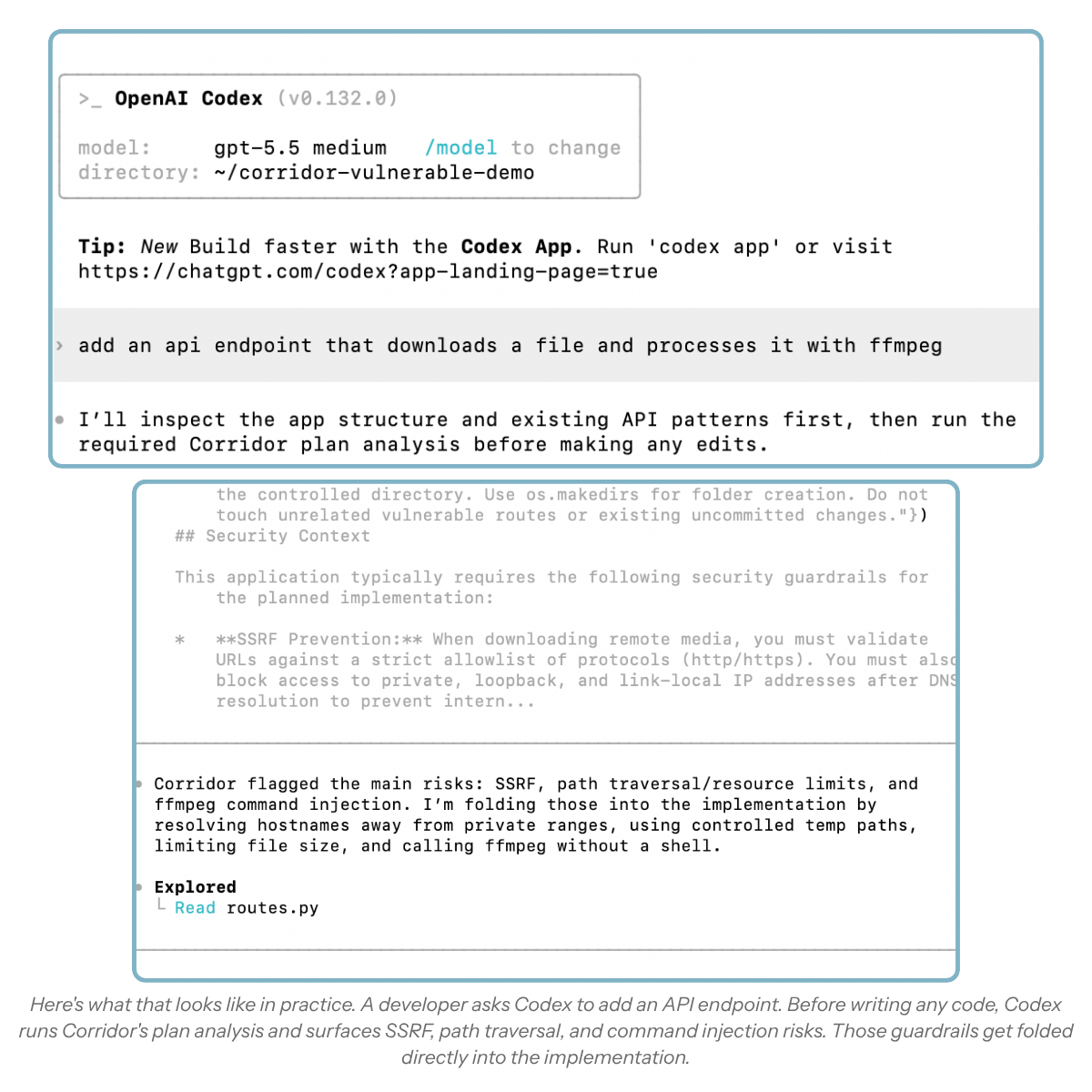
MCP Compliance
As MCP usage grows, teams need visibility into which servers are active and the ability to set policies around them. Corridor's compliance layer tracks active MCP servers in real time and lets teams configure allowlists or blocklists from the Corridor dashboard.
This isn't a relay or a proxy. It works for both local and remote MCP servers, and it adds no friction to the developer workflow.
Getting Started
Setup takes one command.
Install the Corridor CLI
curl -fsSL https://app.corridor.dev/cli/install.sh | bash
The installer detects the codex binary in your PATH and automatically configures the Corridor MCP server, hooks, and agent rules for Codex. It also installs Corridor for any other supported agents you have, including Claude Code and Factory, so one install covers your full stack. If you add a new agent later, re-run the installer.
Verify the connection
Restart Codex if it's running. Run /mcp inside Codex to confirm the MCP server is connected, or check ~/.codex/config.toml for a [mcp_servers.corridor] entry.
Once you see it, Corridor is live. From that point forward, Codex will invoke Corridor's security checks as it writes code, catching vulnerabilities and enforcing your policies automatically.
Right before or right after installing, import your git repos to app.corridor.dev. You can also see your stats at app.corridor.dev.
If hooks aren't running, corridor install --force will refresh the configuration.
What's Next
Codex support is part of a broader direction: security that's native to AI coding, not bolted on afterward.
The goal has always been the same: security that operates at the speed of generation, without requiring developers to change how they work. Corridor running invisibly in the background while the agent does its job is what that looks like in practice.
We're continuing to expand coverage across the agentic coding ecosystem. If you're using Codex and want to get started, sign up here or learn more at Corridor docs.